Choosing a Google Ads Gold Coast agency is a budget decision first, and a marketing decision second. The right partner reduces wasted spend, proves what’s working with clean tracking, and targets locals who can actually buy from you.
This guide gives you an evaluator-ready way to compare agencies without jargon, hype, or vague promises. You’ll get red flags to watch for, a practical checklist, and a clear process you can use in agency interviews.
TL;DR
- Choose an agency that reports on enquiries and sales outcomes, with cost per enquiry as a core metric
- Confirm your ads target people physically in the Gold Coast, using the “Presence” location setting
- Expect ongoing search term reviews + negative keywords to reduce wasted spend.
- Don’t send every click to the home page, use service-specific landing pages.
- Ensure you own your Google Ads account and have full access.
Know what “wasted spend” looks like on the Gold Coast
Wasted spend is not always caused by bad ads, with many Gold Coast campaigns losing budget through poor location targeting, mistimed campaigns, and low intent traffic.
Common causes of wasted Google Ads spend
Wrong location settings: your ads show to people interested in the Gold Coast (tourists researching, people planning a move) instead of people in the Gold Coast who can book today. In Google Ads this relates to the location option often described as “Presence or Interest”. For many service businesses, you typically want Presence (people in your area), not Interest.
Broad keywords with no guardrails: a trades business bidding on vague terms without strong negatives pays for clicks from DIY searchers, students, job seekers, and people outside your service area.
No call or form tracking: you see clicks, not outcomes. That’s not measurement; it’s a receipt.
Generic landing pages: sending every click to the homepage forces people to hunt. A focused page that matches the ad converts more enquiries.
Search terms ignored: if nobody reviews the actual phrases triggering your ads, irrelevant traffic creeps in quietly.
If your spend is rising and results aren’t, the fix often sits in structure and targeting, not bigger budgets.
Common causes of wasted Google Ads spend
Wrong location settings
The default “Presence or Interest” targeting shows your ads to people merely searching about the Gold Coast, including tourists, interstate researchers, and people planning a move. Switching to “Presence” only ensures your budget goes to people physically located in your service area. For local service businesses, this single setting can cut wasted spend significantly before any other change is made.
Broad keywords with no negatives
Broad match without a structured negative keyword list pulls in DIY searchers, job hunters, and unrelated commercial intent. A trades business bidding on “bathroom renovation” without negatives often pays for “bathroom renovation jobs”, “bathroom renovation course”, or “bathroom renovation DIY”. Negatives need to be reviewed weekly in the first 60 days, then monthly once the account stabilises.
No call or form tracking
Without conversion tracking tied to calls (via call tracking like CallRail or Google’s forwarding numbers) and verified form submissions, the campaign has no signal to optimise against. Smart Bidding strategies like “Maximise Conversions” or “Target CPA” cannot work without clean conversion data, so the algorithm essentially flies blind.
Generic landing pages
Sending every click to the home page hurts Quality Score and conversion rate. Google rewards message match between ad and landing page, which lowers cost per click. A dedicated landing page for each core service typically lifts conversion rate two to three times compared to a home page.
No search term review
The Search Terms report shows the actual phrases triggering your ads, which often differ from the keywords you bid on. Without weekly review in the early stages, irrelevant terms accumulate, dragging down click through rate and Quality Score, which then increases your cost per click across the whole account.
If spend is climbing while enquiries stay flat, the issue almost always sits in account structure, match types, and conversion tracking rather than budget size.

Set the baseline: what results should be tracked (and shown to you)
What Proper Google Ads Tracking Looks Like
Before you compare any agencies, lock in what “good management” looks like in reporting. If an agency can’t show these clearly, your account runs on guesswork.
Minimum tracking a serious agency should set up
- Call tracking tied to campaigns (and ideally keywords/search terms where possible)
- Form tracking that records real submissions (and filters spam as best as possible)
- Key action tracking (e.g., quote requests, booking confirmations, enquiry buttons)
- Reporting that includes cost per enquiry, not only cost per click
- Visibility into location performance (so you can stop paying for areas you don’t service)
If you also invest in SEO or other channels, tracking needs to be clean enough that paid results aren’t “claiming credit” for everything.
- Call tracking tied to campaigns and, where possible, to specific search terms
- Form tracking that records verified submissions and filters bot traffic
- Tracking for key actions like quote requests, booking confirmations, and enquiry button clicks
- Cost per enquiry reported alongside cost per click and cost per conversion
- Location-level performance data so you can identify which suburbs are producing enquiries and which are draining budget
Attribution matters too. If you run SEO, social, or email alongside Google Ads, conversion tracking needs to be clean enough that paid campaigns aren’t taking credit for enquiries that came from other channels. This is one of the most common reasons agencies report inflated results.

What to look for in a Google Ads Gold Coast agency
A good Google Ads manager is accountable for outcomes, transparent about what they’re doing, and proactive about cutting waste. Here’s what to look for.
1) Clear account structure (not one messy campaign)
Strong accounts are usually structured around:
- branded vs non-branded search
- core services (separate themes/ad groups)
- locations or service areas (where relevant)
- remarketing (if it suits your buying cycle)
This improves relevance and usually makes performance more stable over time.
Clear account structure
Strong Google Ads accounts are deliberately structured rather than thrown together. The campaign breakdown usually separates:
- Branded search (your business name and variations) from non-branded search, because branded clicks are cheap and convert at very different rates
- Core services into their own campaigns or tightly themed ad groups, so each ad and landing page can match the searcher’s intent
- Locations or service areas where the suburbs you cover have meaningfully different competition or pricing
- Remarketing, but only if your buying cycle is long enough that returning visitors are worth chasing
Structure matters because Google’s bidding algorithms learn at the campaign and ad group level. Mixing services into one campaign means the algorithm cannot optimise for each service properly, and your best-performing service ends up subsidising your worst.
2) A specific plan to reduce wasted spend
Ask how they handle:
search term reviews (how often?)
negative keywords (ongoing or set-and-forget?)
match types and intent filtering
location targeting controls (especially critical locally)
If an agency can’t explain this simply, you’ll likely keep paying for junk clicks.
A specific plan to reduce wasted spend
Wasted spend is rarely caused by one big mistake. It builds up through small gaps in account hygiene that compound over weeks. A capable agency should explain how they handle each of the following:
- Search term reviews, including how often the actual triggering phrases are checked against the keywords being bid on
- Ongoing negative keyword management, treated as a continuous process throughout the life of the account
- Match type strategy, given that broad match has loosened considerably in recent years and exact match now triggers on close variants
- Location targeting controls, particularly the difference between “Presence” and “Presence or Interest” settings, which catches out a surprising number of accounts
Account hygiene matters because Google’s bidding algorithms learn from every click that comes through. When negative keyword discipline is weak, the algorithm spends weeks training on the wrong audience, which then takes time to correct.
3) Reporting that answers business questions
Good reporting should show:
- enquiries/conversions
- cost per enquiry
- conversion rate
- which services are producing results
- which locations are producing results
- what they changed and what they’ll change next
Not just “impressions are up”.
Reporting that answers business questions
Useful reporting should include:
- Enquiries and conversions, broken down by campaign and ad group
- Cost per enquiry alongside cost per click and cost per conversion, since these three metrics tell different stories
- Conversion rate at both the click level and the landing page level
- Performance by service, so underperforming offerings are visible inside the data
- Performance by location, since suburb-level data often reveals that a small number of postcodes drive most enquiries
- A change log showing what was adjusted in the period and what is planned next
Reporting should also account for attribution. If your business runs SEO, social, or email alongside Google Ads, the conversion windows and attribution models in Google Ads can overstate paid performance. A good agency explains how attribution is configured and what assumptions sit behind the numbers.
4) Account ownership and access
You should understand:
- who owns the account (in most cases, you should)
- whether you have admin access
- what happens if you leave (you keep the history and data)
Account ownership and access
This is one of the simplest things to check and one of the most overlooked. The questions to settle before signing anything:
- Whose Google Ads account is being used, yours or the agency’s
- Whether you have administrator access from day one
- What happens to the account, the historical data, and the conversion tracking setup if the relationship ends
Some agencies still run client campaigns inside their own Manager account (sometimes called an MCC) without giving the client an owned account. When the relationship ends, the account, the audience lists, the conversion history, and the entire bidding history stay with the agency. A serious agency sets up the account in the client’s name and operates it through delegated admin access, so the client retains ownership while the agency does the day-to-day work.
5) Landing page and website support
If ads are managed well but your landing pages are weak, results plateau.
Even small improvements can lift conversion rate:
- clearer headline and service offer
- stronger trust signals (reviews, licences, process, FAQs)
- faster mobile load time
- more obvious CTAs
Landing page and website support
Google Ads performance is capped by the page the click lands on. Even a well-managed campaign cannot rescue a landing page that loads slowly, hides the offer, or fails to match the ad message.
Landing page improvements that consistently lift conversion rate include:
- A headline and offer that match the ad copy closely, since message match contributes to landing page experience, one of the three components of Google’s Quality Score
- Trust signals positioned above the fold, such as reviews, certifications, licence numbers, or recognisable client logos
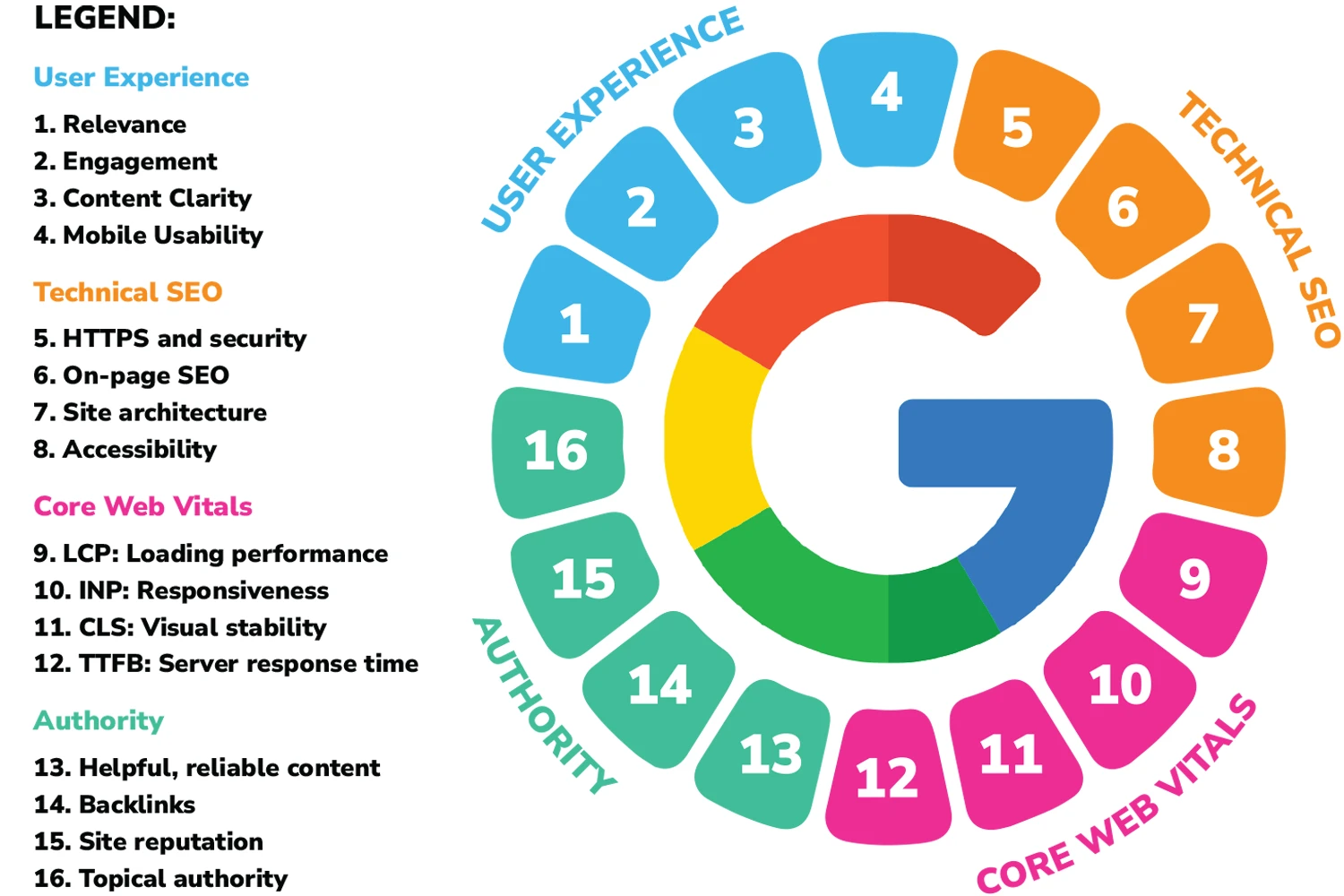
- Fast mobile load times, since Core Web Vitals scores influence landing page experience and directly affect conversion rate
- A single, obvious primary call to action so the visitor knows what to do next
An agency that manages ads in isolation, with no input on the landing page, leaves real performance on the table. Strong campaign management cannot fix a page that does not convert.
Questions to ask before hiring a Google Ads manager
Use these as a practical shortlist:
- How will you set up conversion tracking for calls and forms?
- How often do you review search terms and add negative keywords?
- How will you structure campaigns by service (and why)?
- How do you decide which keywords to bid on (and which to avoid)?
- What will reporting include each month?
- What changes do you typically make in the first 30 days?
- Do you recommend dedicated landing pages for campaigns?
- Who owns the ad account and data?
Red flags when hiring a Google Ads agency
Be cautious if an agency:
- won’t provide full access to your Google Ads account
- insists on running ads in an account you don’t own
- reports only on clicks and impressions (without enquiries / cost per enquiry)
- can’t clearly explain their approach to search terms + negative keywords
- won’t discuss conversion tracking before launching
- pushes a long contract without clear KPIs, reporting, and change logs
Common “Google Ads packages” traps (what to compare instead)
Some providers sell packages based on the number of campaigns, ads, or keywords. That can be a poor way to assess value.
What matters more is:
- whether tracking is correct
- whether the traffic is relevant
- whether enquiries come in at a sustainable cost
- whether the account is actively improved (not set-and-forget)
If you’re comparing Google Ads packages Gold Coast, compare them on transparency, measurement, and strategy, not just deliverables.
Our approach to Google Ads management (what you should expect)
A sensible Google Ads management process usually includes:
- Tracking setup and verification (calls, forms, key actions)
- Account structure by service and intent (not one catch-all campaign)
- Ongoing search term reviews + negative keywords to reduce wasted spend
- Ad and landing page alignment (message match improves conversion rate)
- Regular reporting focused on enquiries and cost per enquiry — plus next actions
If you’re comparing providers, ask them to walk you through their process in plain language. If it feels vague, it usually is.
Further reading (official resources)
If you want to sanity-check the fundamentals, these official docs are useful:
(Any serious provider should be comfortable explaining how they apply these in your account.)
FAQ: Google Ads Gold Coast
How much should I spend on Google Ads on the Gold Coast?
It depends on your industry and how competitive the keywords are. A better way to think about it is:
- what an enquiry/customer is worth to you
- your target cost per enquiry
- your capacity to handle enquiries
A good agency will help you set a realistic starting budget and scale based on results.
How long does Google Ads take to work?
You can often start generating enquiries quickly, but the first few weeks are usually about:
- tightening keyword targeting
- improving ad relevance
- cleaning up search terms
- testing landing page messaging
- validating conversion tracking
You should expect optimisation, not perfection on day one.
Why am I getting clicks but no enquiries?
Most often it’s one of these:
- keywords are too broad (wrong intent)
- landing page doesn’t match the ad promise
- website is slow or confusing on mobile
- conversion tracking is wrong (so the campaign isn’t learning)
Should I run Google Ads and SEO together?
For many service businesses, yes:
- Google Ads captures demand immediately
- SEO builds long-term visibility and reduces reliance on paid traffic over time
- They work best when they share the same messaging and landing pages.
What’s the difference between a Google Ads freelancer and an agency?
Freelancers can be great for simpler accounts. Agencies are often better when you also need:
- landing page/web support
- broader strategy across channels
- more robust reporting and processes
The right choice depends on your goals and how complex your campaigns are.
About this guide
This article is written by the Media Booth team as general guidance for Australian businesses comparing Google Ads providers. Every account and industry is different, so use this as a checklist and consider getting personalised advice before making big budget decisions.
Want help with Google Ads on the Gold Coast?
If you want Google Ads management that’s built around measurable outcomes, supported by proper tracking, landing pages and ongoing optimisation, Media Booth can help.
Next step: Get in touch to discuss your goals, budget range, and the services you want to promote.