Are you a small business owner who wants to spend less time on the details of running your business and more time on the things that matter most?
If so, this article is for you! We’ll walk you through what business automation is and how it can help your small business get more done in less time.
Here are our picks for the top 5 small business automation tools in 2026! If you need help connecting these tools into a broader AI business systems and automation approach, a coordinated build can make the pieces work together.
Business Automation
What is it?
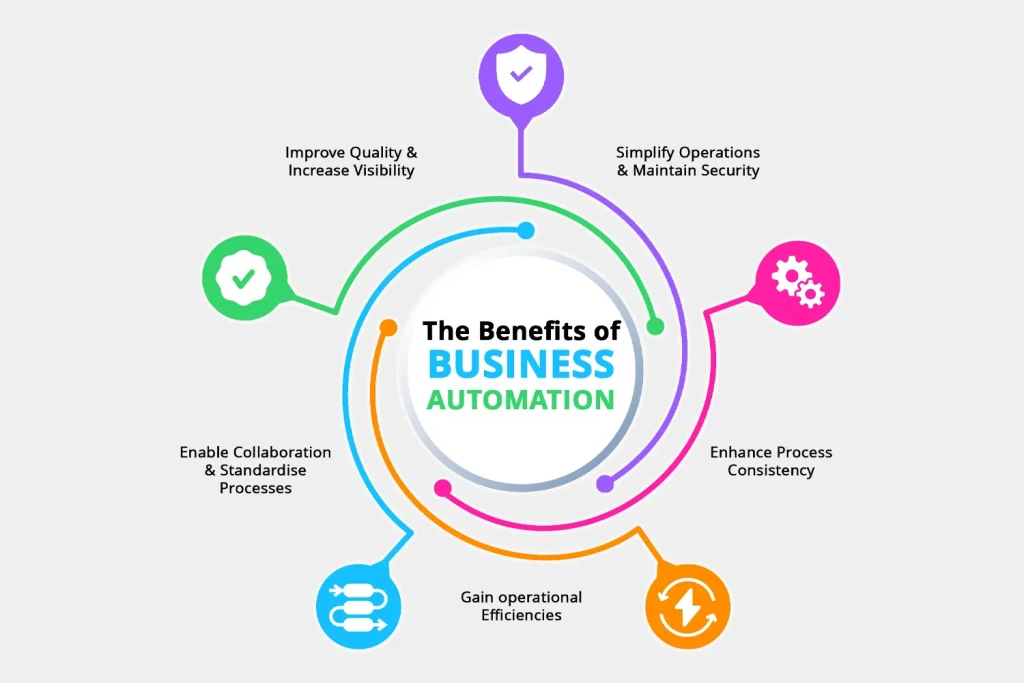
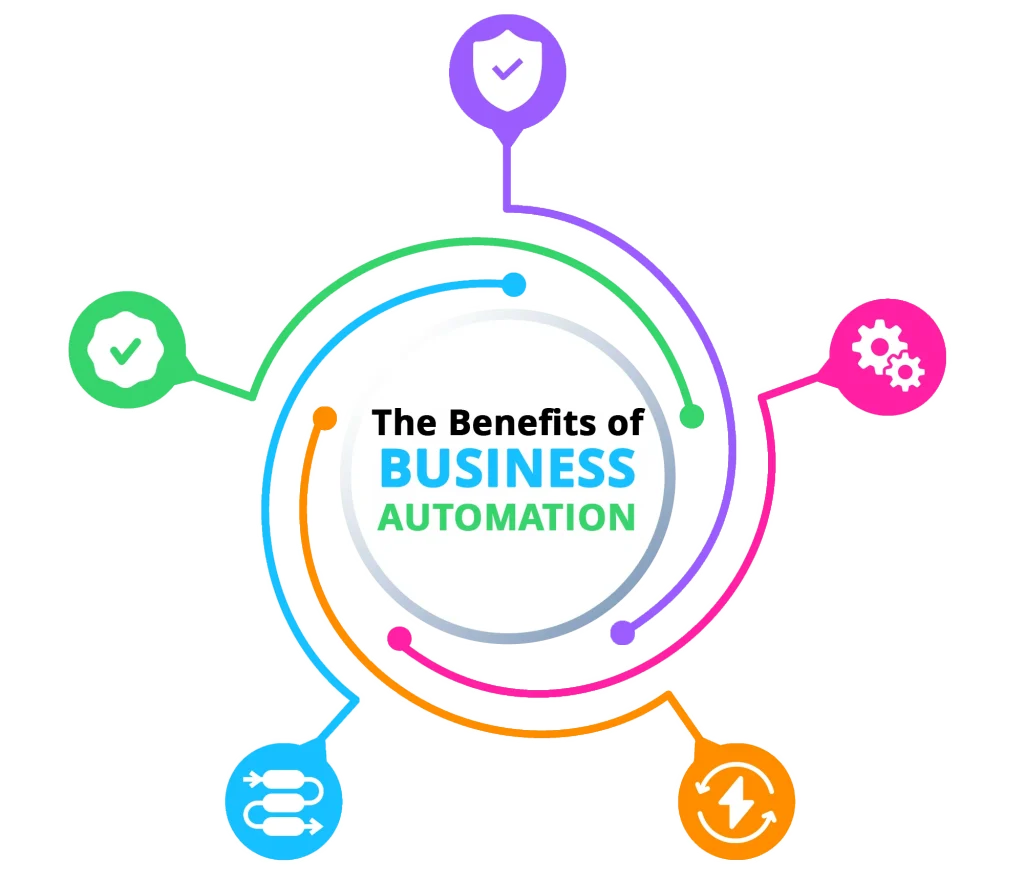
Business automation is a process of implementing technological solutions that streamline your operations and make them more efficient.
In other words, using software tools to do your tedious tasks for you. Some common examples of business automation include cloud-based software like accounting and CRM programs.
Why do you need it?
The primary benefit of business automation is increased efficiency and productivity.
Automating tasks like human resources management (HRM) can help you get more done with fewer resources while saving money on overhead costs like office space or equipment purchases.
How to get started?
The first step in implementing business automation is identifying what solution would work best for your organisation’s needs—and then finding a vendor who can install it for you! There are many vendors out there who specialize in this kind of work, so don’t hesitate to do some research before making an investment that could save money down the line!
With so many tools available to help you automate your processes, it’s hard to know which one is right for you. So, we’ve compiled a list of the top 5 small business automation tools in 2026.
5. Calendly
Business Scheduling

Calendly is a simple tool that helps you avoid time-consuming back-and-forth emails with clients and colleagues. You create a meeting using Calendly and embed the link in your email invitation. The recipient selects their preferred time, and the event is automatically added to your calendar – no hassles.
Key Features
- Availability Preferences
Set different availability schedules per event type, add buffer times between meetings, and cap the number of meetings per day or week. This prevents your calendar from getting overloaded. - Routing Forms
Screen invitees with qualifying questions before they book. Based on their answers, Calendly can route them to the right event type, team member, or even an external URL. This has replaced the simpler qualifying forms from 2022. - Round-Robin and Collective Scheduling
Distribute meetings evenly across team members with round-robin, or schedule meetings with multiple hosts at once using collective events. Ideal for sales teams and client onboarding. - Workflow Automation
Trigger automated emails, SMS reminders, and follow-up surveys before and after meetings. You can chain multiple actions together for a complete meeting workflow. - Meeting Polls
When you need to find a time that works for a group, send a poll and let attendees vote on their preferred time slots. - Multiple Calendar Connections
Connect up to six calendars per user on paid plans, so Calendly checks availability across your work, personal, and team calendars before offering open slots. - CRM and Payment Integrations
Native connections with Salesforce, HubSpot, Stripe, and PayPal. Collect payments at the time of booking or push meeting data straight into your CRM.
Pricing
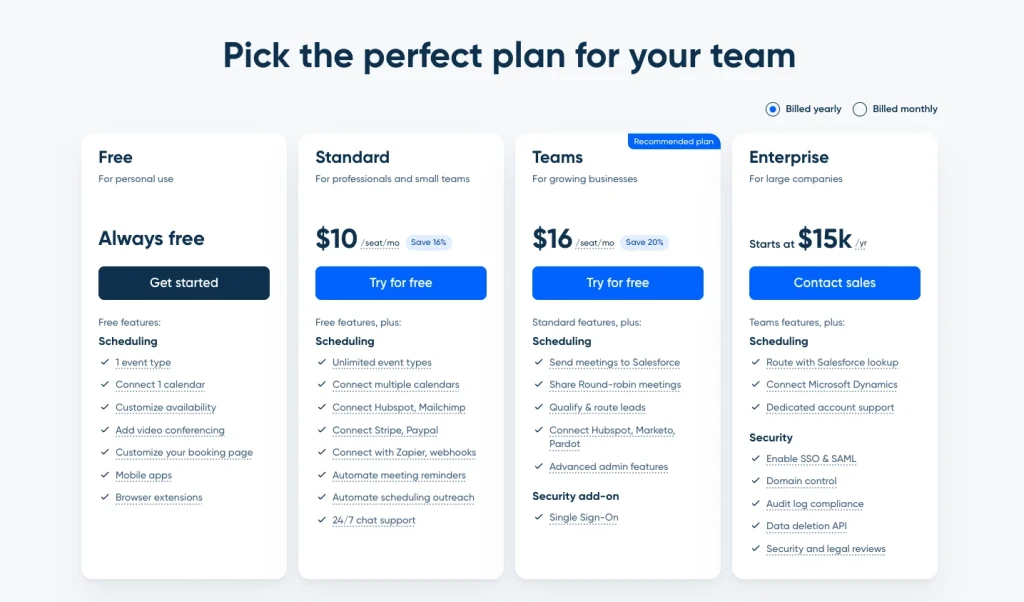
Calendly comes with a free option and three tiers of paid plans.
- Free: Always Free
- Standard: $10/seat/month
- Teams: $16/seat/month
- Enterprise: Contact the sales team for pricing
Strengths
- One of the easiest scheduling tools to set up and share
- Routing forms let you qualify leads before they book a meeting
- Integrates natively with Zoom, Google Meet, Microsoft Teams, HubSpot, and Salesforce
- Free plan is generous enough for solo operators who only need one meeting type
Weaknesses
- Per-seat pricing adds up quickly for growing teams
- Free plan is limited to a single event type, which most professionals outgrow fast
- Customisation of booking page design remains limited compared to some alternatives
4. Hootsuite
Social Media Management

Social media marketing has become an essential part of most businesses marketing strategies. To make the most of this powerful channel, you need a tool that can handle all your social media channels without getting overwhelmed.
This is where Hootsuite comes in handy. The tool allows you to manage multiple social media accounts from one place and post content on each of them at scheduled times using the calendar view.
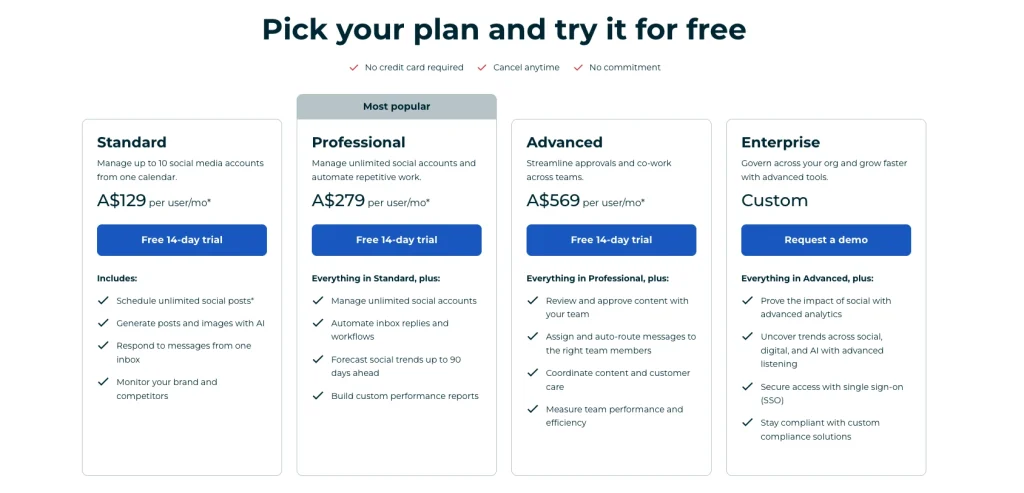
However, Hootsuite has changed significantly since 2022. The free plan has been removed entirely, and pricing has increased substantially. The entry-level Standard plan now starts at around $199 per month per user on annual billing. For many small businesses, this puts Hootsuite firmly in the premium category.
On the upside, the platform now includes AI-powered content suggestions, improved analytics, and support for newer platforms like TikTok. If your business has the budget, it remains one of the most comprehensive social media management tools available.
Key Features
- Cross-Platform Posting
Create content once and publish it across multiple social media accounts simultaneously. Supports Facebook, Instagram, LinkedIn, X (Twitter), TikTok, Pinterest, and YouTube. - Post Scheduling and Calendar
Schedule posts days, weeks, or months in advance using a visual calendar. Hootsuite suggests optimal posting times based on your audience data. - AI Content Assistant
Hootsuite now includes an AI tool that helps generate post copy, suggest hashtags, and recommend content ideas based on trending topics in your industry. - Analytics and Reporting
Track engagement, reach, and follower growth across all connected accounts. Generate exportable reports for clients or stakeholders. - Social Listening
Monitor brand mentions, keywords, and competitor activity across social platforms. Available on higher-tier plans. - Team Collaboration
Assign posts for approval, manage team permissions, and coordinate workflows across multiple users. Useful for agencies or businesses with a dedicated social media team.
Pricing
Hootsuite is available in three tiers of paid plans.
- Standard: A$299 per month
- Advanced: A$599 per month
- Enterprise: Contact the sales team for pricing
Strengths
- One of the most comprehensive social media management platforms available
- Strong analytics and reporting with AI-powered recommendations
- Supports a wide range of platforms including TikTok
- Team collaboration features have improved over recent updates
Weaknesses
- No free plan. The entry price is now a significant commitment for small businesses
- Per-user pricing means costs scale fast as your team grows
- Several competitors now offer similar features at a fraction of the cost
3. Kudosity
SMS Messaging Service

Kudosity is a way to send many SMS messages all at once. It is used by businesses and individuals, who want to send out large batches of SMS messages.
The main use cases are:
- Promotional messages, such as reminders about sales or new products
- Corporate announcements, such as changes in company policy or staff changes
- Notifications, such as when an order has been shipped or your account has been compromised
Key Features
- Multi-Channel Messaging
Send SMS, MMS, RCS, and WhatsApp messages from a single platform. This is a major expansion from the SMS-only offering in 2022. - Conversational AI
Set up automated, two-way SMS conversations that can qualify leads, collect responses, and re-engage dormant contacts without manual effort. - Revenue Attribution
Track exactly how much revenue each SMS campaign generates in real time. This goes beyond clicks and open rates to show actual sales impact. - Audience Targeting
Segment your contact list by demographics, location, or behaviour and send targeted messages to specific groups. - Automated Campaigns
Set up triggered messages for abandoned carts, appointment reminders, order updates, and birthday promotions. The Shopify integration handles e-commerce triggers natively. - Delivery Tracking and Analytics
Monitor delivery rates, open rates, click-through rates, and opt-out rates from a centralised dashboard. - 7,000+ Integrations
Connects with Salesforce, Oracle, Zoho, Shopify, Mailchimp, and thousands more via Zapier. Also offers a developer API for custom integrations.
Pricing
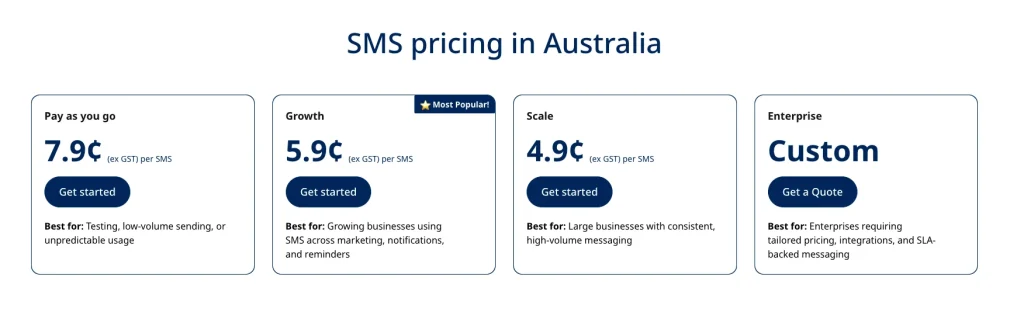
Kudosity is available in three tiers of paid plans.
- Starter: $0.079 per SMS
- Business: $0.059 per SMS
- Enterprise: $0.049 per SMS
Strengths
- 100% Australian-owned with local support and Australian data residency
- Now supports SMS, MMS, RCS, WhatsApp, and conversational AI
- Integrates with 7,000+ tools via Zapier, plus direct connections to Salesforce, Shopify, and more
- Revenue attribution tracking shows exactly what each SMS campaign earns
Weaknesses
- Per-SMS pricing can add up at very high volumes
- Some users have noted that unused credit is not refundable
- Less well-known internationally compared to larger providers like Twilio
2. Pipedrive CRM
Sales Management

Pipedrive is a CRM (Content Relationship Management) that helps you manage your sales pipeline, which consists of all the leads, opportunities, and deals in your business.
With Pipedrive, you can keep track of your contacts’ details and activities, create sales pipeline reports, and track performance over time. You can also automate many tasks to make sure that nothing falls through the cracks.
Key Features
- Visual Sales Pipeline
Drag-and-drop interface that shows every deal at a glance. Customise pipeline stages to match your actual sales process, from first contact through to close. - AI Sales Assistant
Pipedrive now includes an AI tool that analyses your pipeline activity and suggests next steps, flags deals at risk of going stale, and recommends actions to move things forward. - Sequences
Build structured, repeatable follow-up workflows that combine manual emails and scheduled tasks. Ideal for lead nurturing without losing the personal touch. - Forecast View and Reporting
Visualise expected revenue by close date and track performance against targets with customisable dashboards and reports. Available on Premium and above. - Email Sync and Templates
Sync your inbox directly with Pipedrive so every email is logged against the right deal. Save and reuse email templates for common follow-ups. - LeadBooster (Add-on)
A suite of lead generation tools including a chatbot for your website, live chat, web forms, and a prospecting tool for finding new contacts. - Campaigns (Add-on)
Send email marketing campaigns directly from Pipedrive. Includes a drag-and-drop builder, segmentation, and basic A/B testing. Starts at $16/month. - 500+ Integrations
Connects with Zapier, Mailchimp, Kudosity, Slack, Zoom, Google Workspace, and hundreds of other tools via the marketplace.
Pricing
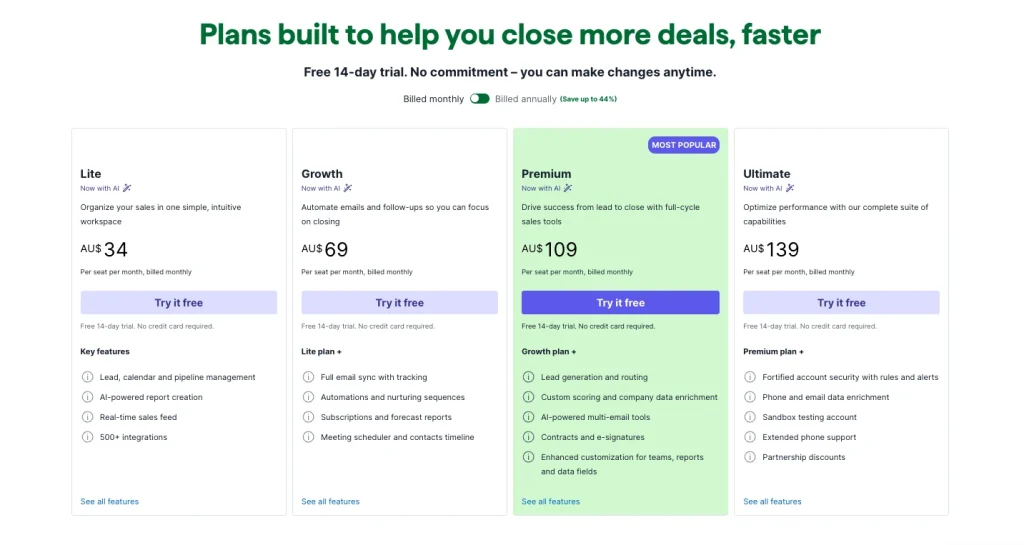
Pipedrive is available in four tiers of paid plans.
- Lite: US$14 per month
- Growth: US$39 per month
- Premium: US$59 per month
- Ultimate: US$79 per month
Strengths
- Visual pipeline management is still best-in-class for sales teams
- AI Sales Assistant provides deal insights and activity suggestions
- 500+ marketplace integrations; works well with Zapier, Mailchimp, Kudosity, and more
- Sequences feature helps build repeatable, structured follow-up workflows
Weaknesses
- No free plan (competitors like HubSpot and Zoho CRM offer one)
- Add-ons can push real costs well above the base price for small teams
- Built-in email marketing (Campaigns add-on) is basic compared to dedicated platforms
As an Australian Authorised Pipedrive Partner for over nine years, Media Booth has implemented custom Pipedrive solutions across a wide range of industries.
1. Mailchimp
Email Services

Mailchimp is a platform for sending emails. It allows you to create and send newsletters, emails, and other forms of communication to your customers. It also helps you manage your email list and keep track of who has opened your emails.
Mailchimp allows users to create a free account or pay for additional features such as advanced analytics, A/B testing, landing page creation, and more.
We personally rely on Mailchimp for all our email automation services because of the company’s experience in business automation and digital marketing tools.
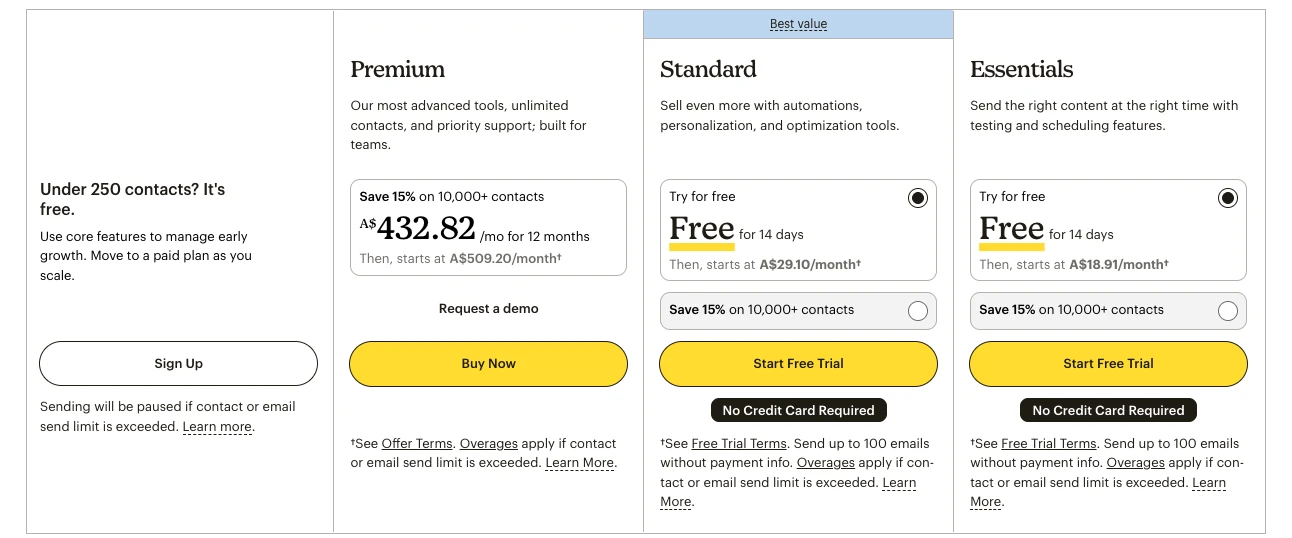
That said, Mailchimp has changed significantly since 2022. Following its acquisition by Intuit in 2021, pricing has increased multiple times. In January 2026, the free plan was reduced from 500 contacts and 1,000 sends to just 250 contacts and 500 sends per month. Multi-step automation now requires the Standard plan or above. An additional price increase of 11 to 13 per cent for legacy plan users was confirmed for April 2026.
Despite these changes, Mailchimp still offers a strong feature set for businesses that need a reliable email marketing platform with good integrations.
Key Features
- Email Campaigns
Create and send newsletters, promotional emails, and announcements using a drag-and-drop builder with a library of customisable templates. - Marketing Automation
Set up automated welcome sequences, abandoned cart emails, birthday messages, and drip campaigns. Multi-step automation is available on the Standard plan and above. - Audience Segmentation
Segment your contact list by behaviour, purchase history, location, engagement level, and custom tags. The Standard plan includes predictive segmentation powered by AI. - Landing Pages and Forms
Build landing pages and signup forms to grow your email list. Includes customisable templates and basic analytics. - AI Content Suggestions
Mailchimp now offers AI-powered subject line suggestions and content recommendations to help improve open rates and engagement. - Send-Time Optimisation
Available on Standard and above. Mailchimp analyses your audience data and sends emails at the time each subscriber is most likely to open them. - Reporting and Analytics
Track open rates, click rates, revenue per email, and subscriber growth. Compare campaign performance over time with built-in reports. - Integrations
Connects with Shopify, WooCommerce, WordPress, Pipedrive, Zapier, and hundreds of other tools.
Pricing
Mailchimp comes with a free option and three tiers of paid plans.
- Free: $0.00 per month
- Essentials: $18.83 per month
- Standard: $28.98 per month
- Premium: $507.08 per month
Strengths
- Widely used with strong brand recognition and a large support community
- Good template builder and landing page tools
- AI-powered content suggestions and send-time optimisation on Standard and above
- Strong integration ecosystem including Shopify, WordPress, Pipedrive, and Zapier
Weaknesses
- Free plan has been significantly reduced and is barely usable for most businesses
- Unsubscribed and inactive contacts still count toward billing unless manually archived
- Prices have increased significantly since the Intuit acquisition
- Multi-step automation now requires the Standard plan ($20+ per month)
Conclusion
You do not need to adopt all five tools at once. Start with one or two that solve your most pressing pain points, whether that is scheduling, email follow-ups, lead tracking, or customer messaging. Build from there as your business grows.
The tools on this list all integrate well with each other, which means you can build a connected system over time. For example, a lead books through Calendly, enters your Pipedrive pipeline, receives automated email sequences through Mailchimp, and gets an SMS follow-up through Kudosity. That kind of connected workflow saves hours every week.
If you want to take automation further, tools like Zapier can connect your entire stack and trigger actions automatically across platforms.
Not sure where to start? Get in touch with our team for a free marketing audit. We can walk you through what would make the biggest difference for your business right now.
This post was originally published in 2022 and has been fully updated for 2026 with current pricing, features, and recommendations.