
If your making use of Pipedrive’s amazing api you may find the need to have certain reference points like user I.d, deal I.d, contact I.d, organisation i.d and more. This is also a common requirement when using third party integrations like Elementor Pipedrive Form Integration
There are several ways to find these but here I’ll explain a fast little work around to find them.
How to find Pipedrive User I.D
User I.d – this is the I.d of the user you would like to maybe allocate a deal to via third party software or api call. To find this just head to any pipeline in Pipedrive, then on the right hand side drop down the menu that shows user and filters, select the name of the user that you need the I.d of. Once this has loaded head to the url bar and look at the numeric numbers at the end of the url string, this is your user I.d.
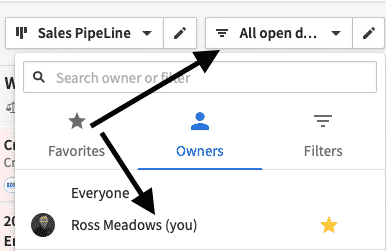
Next head to your browser url bar, this should look something like yourcompanyname.pipedrive.com/ in that url string you will notice it says https://yourcompanyname.pipedrive.com/pipeline1/user/####### (# being the user i.d it should be a string of numbers only.

Thanks for reading my blog on Pipedrive LTDs. I hope it helps! Does your business need help customising or maximising Pipedrive? Our team of experts are highly trained in Pipedrive and have built out many custom Pipedrive solutions, from small to big. We offer assistance with automation, layout and configuration changes, email blasts, custom fields, API integrations and so much more. Head over to our Pipedrive page and send us an enquiry to get the conversation started on how we can help!
Ross Meadows